
基于swr封装的接口缓存hook-useSwr
swr简介
swr是由NextJs背后的团队打造的一个React数据请求库,全称stale-while-revalidate,它的主要的缓存策略是先消费缓存的数据,同时会请求新的数据,当新的数据和缓存的数据不一样时会异步更新缓存中的数据并将新的数据返回,它主要是接收一个key和fetcher,其中key为缓存的唯一标识,fetcher是一个请求的异步函数,它执行的返回值为data:数据、isLoading:没有缓存数据且正在请求、isValidating: 请求验证新老数据/重新加载。
swr特性
- swr 只会在组件中所使用的状态被更新时,触发重新渲染。例如,如果只在组件中使用返回的数据data,SWR 将忽略其他属性(如isValidating和isLoading)的更新,对应页面只会引起一次页面的渲染, 如果data不发生变化, 无论useSwr执行多少次,页面都不会重新渲染。
- 重复请求的删除:swr可以在某个对应的key在多个组件中同时使用时,只发出一次请求。常用场景:例如人员的数据,在详情页使用useSwr获取后 不需要一层一层的props传递数据,你可以在任何使用到这个数据的组件内部直接使用useSwr,当这些组件如果同时渲染时,它只会发出一次请求。并且这个控制重复请求删除的时间是可以配置的,默认2s 可以配置option dedupingInterval属性。
- 自动重新请求:通过配置option refreshInteral ,实现当使用useSwr的组件显示在屏幕上时 自动轮询请求数据,无需手动去处理定时器, 只需关注数据。
封装的useSwr
swr官方的缓存不是长期缓存, 它底层是将数据缓存在一个weakMap中的,页面刷新则会清楚缓存,官方提供了方可以自定义创建一个缓存provider,类似map,来实现长期缓存。通过在页面关闭的时候获取当前缓存的数据,通过localforage写入到indexDb中,然后下次页面onload的时候读取缓存在indexDb中的数据,创建一个map对象传递给swr。由此我们可以自定义哪些请求缓存需要长期缓存或者只是会话缓存。
// 获取swr缓存
 const _swrCache = (await localforage.getItem('_swrCache')) || [];

 function localforageProvider() {
   try {
     // 获取用户长缓存
     const swrCache = _swrCache.filter((item) =>
       item?.[0].includes(`${window.commInfo.companyId}-${window.commInfo.accountId}-l`),
     );
     const map = new Map(swrCache);
     // app关闭时写入本地缓存
     window.addEventListener('beforeunload', () => {
       const appCache = Array.from(map.entries());
       localforage.setItem('_swrCache', appCache);
     });
     return map;
   } catch (error) {
     console.error('swrError', error);
     return new Map();
   }
 }
useSwr代码
import API from '@api'; // 接口
import useSWR from 'swr';

type apiType = keyof typeof API;

// key缓存数据 当key变化时会重新请求数据
interface UseSwrProps {
  api: apiType;
  shouldFetch?: boolean; // 是否请求数据(控制是否请求数据)
  params?: object; // 请求参数,当次会话会缓存,下次会话会重新请求
  defaultParams?: object; // 默认参数 用于缓存默认请求数据,在使用params时使用 不传则默认缓存 例如:列表页的默认参数
  options?: object; // swr配置 详见:https://swr.bootcss.com/docs/api
  handleData?: (result: any) => void; // 处理数据
  onSuccess?: (result: any) => void; // 请求成功回调
}

export default function useSwr({
  api,
  params = {},
  shouldFetch = true,
  defaultParams = {},
  options = {},
  handleData,
  onSuccess,
}: UseSwrProps) {
  const uuid = `${window.commInfo?.companyId}-${window.commInfo?.accountId}`;
  let cacheId = `${uuid}-l`; // l:本地缓存 s:会话缓存
  // 同时有defaultParams和params时且两个对象值相同时本地缓存,否则会话缓存
  if (
    Object.keys(params).length &&
    Object.keys(defaultParams).length &&
    JSON.stringify(params) !== JSON.stringify(defaultParams)
  ) {
    cacheId = `${uuid}-s`;
  }
  const fether = () =>
    API[api](params).then((res: any) => {
      // 处理数据格式
      if (handleData) {
        return handleData(res);
      }
      return res;
    });

  const swrKey: any = [api, cacheId];
  if (Object.keys(params).length) {
    swrKey.push(params);
  }
  const defaultOptions = {
    revalidateOnFocus: false, // 禁止窗口获取焦点时重新请求
  };
  // if (shouldFetch) window.console.log(api, shouldFetch);
  const result = useSWR(shouldFetch ? swrKey : null, fether, { ...defaultOptions, ...options, onSuccess });
  return result;
}
简单示例
shoudFetch是用来控制按需请求手动触发获取数据,不传则默认组件渲染时就会执行,handleData是处理接口返回的数据。
import PreventWhiteScreen from '@/components/PreventWhiteScreen';
import React, { useState } from 'react';
import useSwr from '@/Hooks/useSwr';
import { Botton, Loading } from 'dpl-react';

const DemoUseSwr = () => {
  const [shouldFetch, setShouldFetch] = useState(false);
  const { data: departmentList = [], isLoading } = useSwr({
    api: 'getDepartmentGetDepartmentList',
    shouldFetch,
    handleData: (res) => {
      const list = res || [];
      const deptList = [];
      const recursionDept = (dept) => {
        if (!dept) {
          return;
        }
        dept.forEach((item) => {
          if (item.deptId === -2) {
            return;
          }
          deptList.push({
            id: item.deptId,
            name: item.deptName,
            level: item.level,
          });
          recursionDept(item.subDepartment);
        });
      };
      recursionDept(list);
      return deptList;
    },
  });
  return (
    <div>
      <Loading isLoading={isLoading} />
      <Botton onClick={() => setShouldFetch(true)}>控制请求</Botton>
      {departmentList.map((item) => item.deptName)}
    </div>
  );
};
export default PreventWhiteScreen(DemoUseSwr);
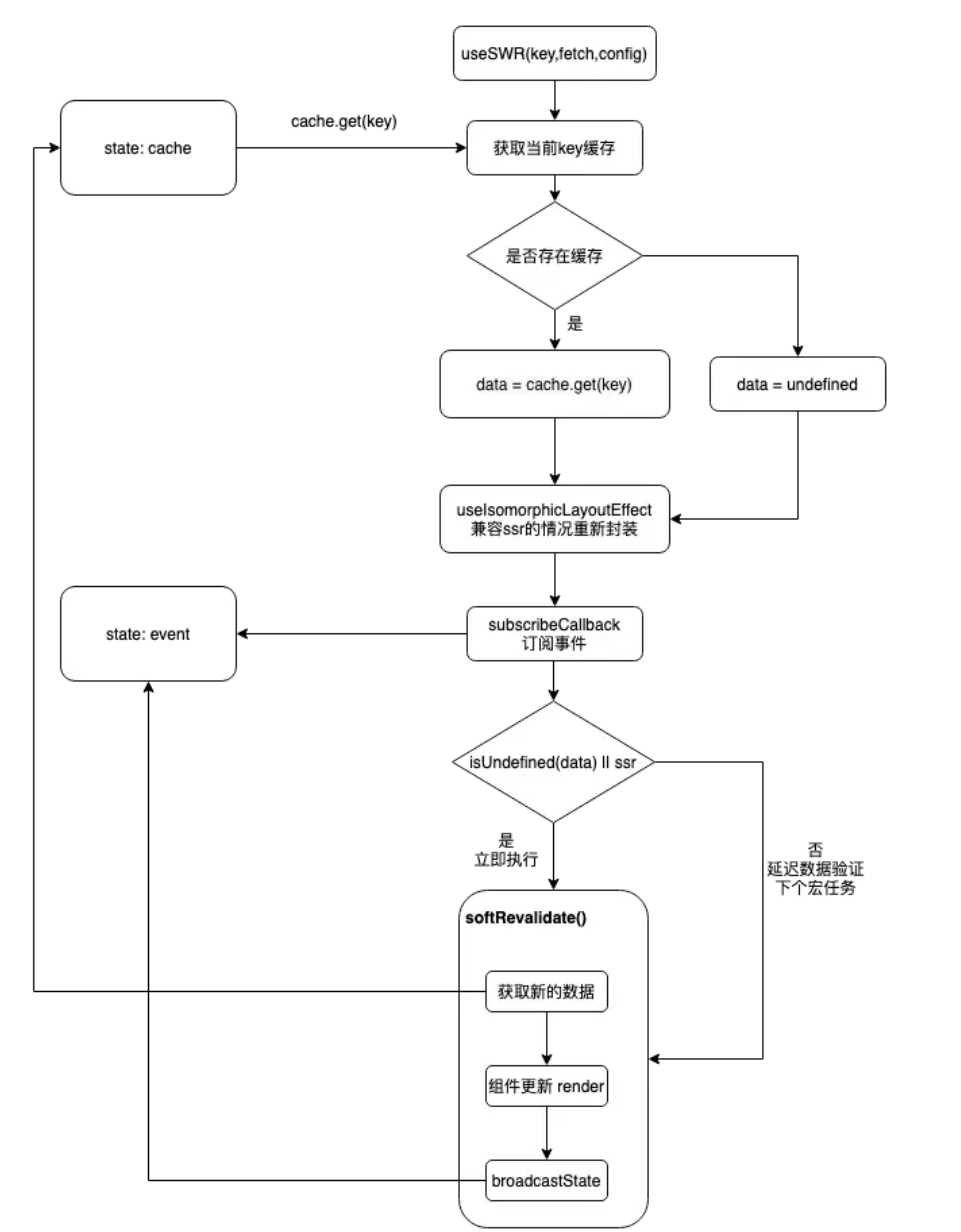
swr核心流程图
hook使用场景
-
使用非常频繁的获取数据接口,这种频繁使用的接口,有时会导致多个组件里都去请求获取了一样的数据,使用hook的话可以实现:无需关注多个组件重复请求的问题(只会发送一个请求)、数据更新自动更新组件内容,从缓存中拿数据组件渲染更快。
-
更简洁的定时器:需要轮询接口 展示最新数据,一行代码即可搞定。
-
预请求:在组件渲染前 render外面可以使用与请求prelpoad 提前load数据, 在render后可以直接使用useSwr获取对应数据
import { useState } from 'react' import useSWR, { preload } from 'swr' const fetcher = (url) => fetch(url).then((res) => res.json()) // Preload the resource before rendering the User component below, // this prevents potential waterfalls in your application. // You can also start preloading when hovering the button or link, too. preload('/api/user', fetcher) function User() { const { data } = useSWR('/api/user', fetcher) ... } export default function App() { const [show, setShow] = useState(false) return ( <div> <button onClick={() => setShow(true)}>Show User</button> {show ? <User /> : null} </div> ) -
提前加载数据: 例如分页, useSwr 接收 params, 因为key是包含params的,当params变化的时候会触发useSwr重新请求。由此可以实现 当tablechange的时候,同时获取当前页的数据和下一页的数据。这样用户在点击下一页的时候 数据已经提前加载完毕了。(表格类的缓存设计是只长缓存默认页,其他的数据缓存只是会话级别的),如下面这个例子:
function App () { const [pageIndex, setPageIndex] = useState(0); return <div> <Page index={pageIndex}/> <div style={{ display: 'none' }}><Page index={pageIndex + 1}/></div> <button onClick={() => setPageIndex(pageIndex - 1)}>Previous</button> <button onClick={() => setPageIndex(pageIndex + 1)}>Next</button> </div> } -
高阶用法:修改本地数据,不用等待远程数据源更新。
-
。。。
相关参考资料
官方文档:https://swr.bootcss.com/docs/getting-started